Design and Rank YouTube Thumbnails on Your Mac
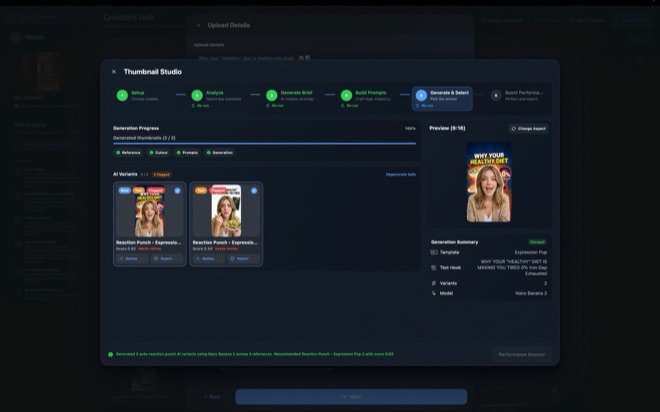
Designing a YouTube thumbnail as an afterthought five minutes before upload usually produces cramped text that repeats the video title word for word. Wonek Video Studio’s Thumbnail Studio guides you through a structured six-step workflow on your Mac—analysing your video, selecting from 39 layout templates, generating and ranking variants, and applying targeted visual refinements.
Why thumbnails fail when built without a layout strategy
Most viewers see your thumbnail on a mobile home feed at roughly the size of a postage stamp. When creators improvise a canvas from scratch, they frequently drop four competing focal points, six lines of thin lettering, and low-contrast dark backgrounds onto the same frame.
Thumbnail Studio treats packaging as an engineering step tied directly to your timeline cut. Instead of staring at a blank 16:9 artboard, the tool reads your video context and brief, identifies key visual moments, writes a packaging strategy, and structures prompts around 39 tested layout archetypes—such as split before/after comparisons, single-object focal zoom, or expressive reaction framing.
Walk through the six-step Thumbnail Studio workflow
Thumbnail Studio combines Pro workflow tooling with your own Google or OpenAI image model keys configured under File → Model Keys, showing estimated provider cost before every generation batch.
Run the six stages in order so you compare distinct visual concepts before polishing details.
- Open Thumbnail Studio on your project so Wonek reads your video and creative brief and extracts key visual moments.
- Review the proposed packaging strategy and pick two or three contrasting structures from the 39 built-in layout templates.
- Confirm the upfront provider cost estimate and generate candidate variants using your configured Google or OpenAI image key.
- Compare the automatic ranking and performance score across variants, then trigger controlled refinements—stronger text, more contrast, more emotion, or less clutter—before exporting or attaching to your YouTube upload.
Use controlled refinements instead of random re-rolling
Re-running a raw image prompt ten times wastes API spend because each roll changes lighting, composition, and typography simultaneously. Once a ranked candidate nails the core idea, Thumbnail Studio’s targeted refinement actions isolate one variable at a time.
Check four practical criteria alongside the studio’s performance score before locking your winner.
- Stronger text: keep thumbnail copy to two to four punchy words that complement—rather than duplicate—your YouTube title.
- More contrast: separate foreground subject edges from the background so the silhouette reads clearly in dark and light mode.
- Less clutter: strip secondary icons and tiny UI screenshots that blur into noise at mobile preview width.
- Bottom-right clearance: keep critical words and faces out of the lower-right corner where YouTube overlays the video duration badge.
Pair title and thumbnail honestly before upload
A high-scoring thumbnail gets the click, while your opening thirty seconds earn retention. Make sure the visual promise on the cover actually appears in the cut—viewers who click for a side-by-side benchmark and find ten minutes of unscripted rambling leave immediately, hurting session watch time.
Save your top two ranked variants to the channel folder on your Mac so you have a clean backup ready if you revise packaging after launch.
How are image generation costs billed in Thumbnail Studio?
Thumbnail Studio is unlocked by Wonek Pro, while image generation runs directly through your own Google or OpenAI API key entered in File → Model Keys. Wonek shows an estimated provider cost before every run and adds zero credit markup.
Does a high performance score guarantee a high YouTube click-through rate?
No tool can guarantee clicks or audience interest. The performance score evaluates composition clarity, contrast, focal hierarchy, and clutter against established thumbnail patterns to catch weak drafts before you publish.
Can I attach the finished thumbnail directly when uploading to YouTube?
Yes. With a connected YouTube channel in Wonek Pro, you can attach your chosen thumbnail alongside your title, description, tags, and schedule right from the publish panel.